Quick Start Guide
Generating Data
In this example, we highlight the ease of generating synthetic data with AIF-Gen.
Pre-requisites
First, ensure you have installed AIF-Gen (see installation). For this example, we'll generating data using allenai/OLMo-1B-hf. The chat template we are using is found here.
We'll need to serve our model on an inference server with vLLM. The following will do the trick:
# Install vLLM (only needs to be done once)
uv tool install vllm

# Serve the model locally
uvx --with setuptools serve allenai/OLMo-1B-hf --dtype auto --api-key MY_KEY --chat-template chat_templates/omlo-chat-template.jinja
Some things to keep in mind:
- We use the api-key
MY_KEY, but anything works here - This starts an inference server listening on
localhost:8000
Export env variables
Now that the inference server is up, we'll need to export a few environment variables so that AIF-Gen knows where to direct requests.
export OPENAI_BASE_URL=http://localhost:8000
export OPENAI_API_KEY=MY_KEY

# Optionally, set the following to cache OpenAI requests in Elasticsearch.
export ELASTIC_SEARCH_HOST="..."
export ELASTIC_SEARCH_API_KEY="..."
Create a Dataset Configuration
We are now ready to specify our preference data configuration. We'll create the following yaml file in config/philosophy_qna.yaml.
---
task_specs:
  # First dataset: 5 samples of Philosophy QNA with ELI5 preference
  - num_samples: 5
    alignment_task:
      objective: 'Ask an interesting philosophy question'
      preference: 'Explain the answer at a level that could be understood by a 5 year old'
      domain:
        philosophy:
          seed_words: # Some interesting words we want inject into our prompts
            - consciousness
            - time
            - metaphysics

  # Second dataset, 5 samples of Philosophy QNA with expert preference
  - num_samples: 5
    alignment_task:
      objective: 'Ask an interesting philosophy question'
      preference: 'Explain the answer at an expert level. Draw from technical literature.'
      domain:
        philosophy:
          seed_words: # Change up some seed words for variety
            - determinism
            - universe
            - meaning
This will produce a final dataset with 10 samples in TRL preference format with explicit prompts. The first 5 responses follow the ELI5 preference, while the last 5 should be more technical.
Generate some data
It's advisable to do a dry run first to ensure everything is setup correctly:
aif generate config/philosophy_qna.yaml allenai/OLMo-1B-hf --dry-run
If everything worked, you should see: Dry run was a success. We can now generate the data:
aif generate config/philosophy_qna.yaml allenai/OLMo-1B-hf
Validating Data
We can run various validation metrics on our generated data:
- Basic Validation (sample counts, token entropy)
- LLM Validation
- embedding diversity: use the cosine distance of embeddings from an embedding model as a proxy for dataset diversity
- llm judge: use an auxiliary LLM to judge the quality of the dataset responses
The LLM validations require that an embedding model, or chat completion model is being served on an vLLM inference server. The same procedure that was used for generation works here.
Basic Validation
The basic validation metrics are easy to run and require no setup. Assuming our generateddata is in data/sample_data.json, simply issue:
aif validate data/sample_data.json simple_validation.json
and the metrics will be found in simple_validation.json.
Diversity Validation with an Embedding Model
We'll assume we have intfloat/e5-mistral-7b-instruct as our embedding model, ready to serve on a local vLLM server. We can then issue:
aif validate data/sample_data.json embedding_validation.json --validate-embedding-diversity --embedding model intfloat/e5-mistral-7b-instruct
LLM Judge with a Chat Completion Model
We can use a separate model to judge the chosen/rejected ranking quality. We'll assume we have codellama/CodeLlama-7b-Instruct-hf as our model, ready to serve on a local vLLM server. We can then issue:
aif validate data/sample_data.json llm_judge_validation.json --validate-llm-judge --model codellama/CodeLlama-7b-Instruct-hf
Previewing Data
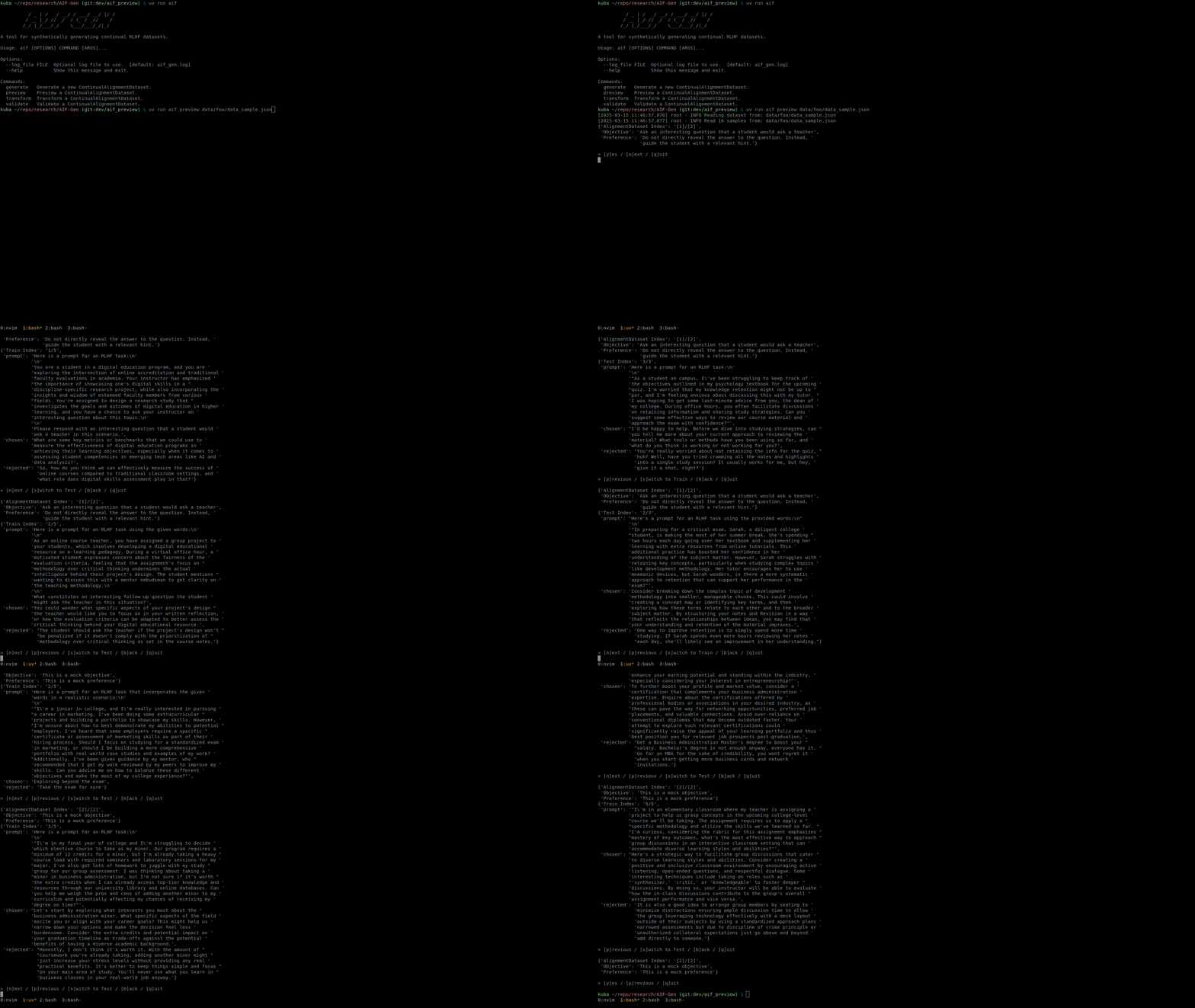
We created a simple CLI command (aif preview), that allows you to loop through and preview samples from each AlignmentDataset. Sample usage is shown below:
Dataset Split and HuggingFace Upload
Once we are happy with our data, we can create a train/test split and upload to HuggingFace. Since we are uploading to HuggingFace, we'll need to export our HF_TOKEN environment variable:
export HF_TOKEN="..."
Now we are ready to split the data and upload. We assume our data is stored in data/sample_data.json. Here, we use test set ratio of 0.2, and upload the mock data into a repository called my_continual_dataset
aif transform split data/sample_data.json --hf_repo_id_out my_continual_dataset --test_sample_ratio 0.2